Industry-standard CNC bending tolerance is ±0.5° to ±1° for angles and ±0.1–0.2 mm for linear dimensions on a single bend. Tighter tolerance is possible but costs more. Three variables control whether you hit your target: K-factor (where the metal stretches during bending — affects flat pattern math), bend radius (the inside curve geometry), and springback (the elastic bounce-back after the press releases). Get all three right at design stage and your bent parts match the drawing. Get any one wrong and the math doesn’t matter — the parts come out off-spec.
Your flat pattern looks perfect in SolidWorks. You send the DXF to your fabricator. The bent parts come back 2 mm off — and your assembly doesn’t fit. The fabricator says “your K-factor is wrong”; you say their bender is inaccurate. You’re both partly right, and the project is delayed by a week.
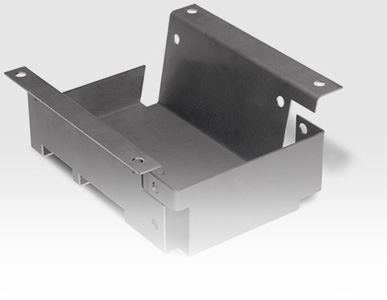
This is the most common loop in sheet metal projects, and almost all of it is preventable at design stage. This guide explains the three variables that actually control bending accuracy, the realistic tolerances you can expect in Singapore, the 15 DFM (design for manufacturability) rules that keep designs benderable, and how to specify tolerances so suppliers can quote you accurately. It’s written for mechanical engineers, CAD operators, design engineers, and QA teams who specify or inspect bent sheet metal parts.
If you haven’t selected a fabricator yet, our sheet metal supplier guide for Singapore covers evaluation criteria. For the broader laser-and-fabrication picture, the complete laser cutting buyer’s guide is a useful primer.
The Three Variables That Control Bending Accuracy
Every dimensional problem in bent sheet metal traces back to one of three variables — or to interactions between them. Mastering these three is the difference between designing parts that work first time and designing parts that need rework.
| Variable | What It Controls | Where It Bites You |
|---|---|---|
| K-factor | Flat pattern length calculation | Parts come out longer or shorter than drawn |
| Bend radius | Geometry of the bent corner | Cracking, wrinkling, dimensional drift |
| Springback | Final bend angle after the press releases | Angle comes out smaller than programmed |
The trap is that any single variable, calculated correctly in isolation, can still produce a wrong result because the three interact. A correct K-factor against the wrong bend radius gives the wrong flat length. A correct flat length without springback compensation gives the wrong final angle. Designing for bending means handling all three together.
Industry-Standard Bending Tolerances in Singapore
The first question to answer before specifying anything: what tolerance is actually achievable, and what does it cost? Singapore CNC bending shops typically work to three tolerance grades:
Realistic ranges and relative cost impact
| Grade | Angle | Linear (single bend) | Cumulative (multi-bend) | Relative Cost |
|---|---|---|---|---|
| Economy | ±2° | ±0.5 mm | ±1.0 mm | 1.0× |
| Standard | ±1° | ±0.2 mm | ±0.4 mm | 1.3× |
| Precision | ±0.5° | ±0.1 mm | ±0.2 mm | 1.8× |
These align with ISO 2768-m (medium) for Standard grade and ISO 2768-f (fine) for Precision grade — the same general-tolerance standards used across most Singapore industrial fabrication.
Two reality checks for designers:
- Don’t default to Precision. About 80% of industrial bent parts work perfectly well at Standard grade. Specifying Precision across an entire drawing when only one or two features actually need it inflates cost without adding value.
- ±0.05 mm or tighter on a bent feature is rarely realistic. If your assembly truly needs that level of precision, the feature should be machined after bending, not relied on from the bend itself.
Most quotes default to Standard if nothing is specified. To get Economy pricing, explicitly note “Economy / ISO 2768-c acceptable” on the drawing. To get Precision, specify which features need it and which can be Standard.
Understanding K-Factor: The Most Misused Number in Sheet Metal
K-factor is the most-cited and most-misunderstood term in sheet metal design. Get it wrong and the entire flat pattern is wrong — by the same amount on every bend.
where θ = bend angle in radians, R = inside bend radius, K = K-factor, T = material thickness
The flat pattern length = sum of flange lengths + sum of bend allowances
The trap most engineers fall into: CAD software default K-factor is rarely correct for your specific situation. SolidWorks defaults to 0.5, Fusion to 0.44, and many shop databases use 0.42 — but actual K-factor varies with material, thickness, bend radius, and even the specific tool. A 5% K-factor error on a 50 mm bend means 0.1 mm dimensional drift. Across four bends in a chassis, that becomes 0.4 mm — enough to fail an assembly check.
Typical K-factor Ranges by Material
| Material | Typical K-factor (Air Bending) | Notes |
|---|---|---|
| Mild steel | 0.41 – 0.44 | Most predictable |
| Stainless steel 304 | 0.41 – 0.43 | Verify per batch — heat-treat variation |
| Stainless steel 316 | 0.40 – 0.43 | Slightly tighter neutral axis |
| Aluminium 5052 | 0.40 – 0.42 | Predictable, easy to bend |
| Aluminium 6061-T6 | 0.38 – 0.41 | Higher strength, more variable |
| Brass / Copper | 0.42 – 0.45 | Soft materials, predictable |
How to Verify K-factor for a Critical Project
- Bend a test coupon — cut a flat strip of known length from the same sheet as your production stock.
- Make a 90° bend at the radius you plan to use, on the same tooling as the production run.
- Measure the two flange lengths and the inside radius, then back-calculate K-factor from the bend allowance formula.
This 30-minute test is the single most valuable thing you can do before committing to a production run. Material certification numbers don’t tell you the actual K-factor — only a test bend does.
Bend Radius: Why “Sharp Corners” Are Forbidden
“Sharp” inside corners on a bent part aren’t actually sharp — they always have some inside radius. The question is how small that radius can be before you start damaging the material.
The rule of thumb that works for most metals: minimum inside bend radius ≥ material thickness. Go tighter and you risk outer-surface cracking, inner-surface wrinkling, and severe dimensional unpredictability because the neutral axis shifts dramatically. Some materials need even larger minimum radii:
| Material | Min. Inside Radius (× thickness) | Why |
|---|---|---|
| Mild steel (low carbon) | 0.5 – 1× | Most forgiving |
| Stainless steel 304 | 1× | Standard ductility |
| Stainless steel 316 | 1 – 1.5× | Slightly less ductile |
| Aluminium 5052 | 1× | Standard alloy |
| Aluminium 6061-T6 | 2 – 3× | Heat-treated alloy is more brittle |
| Brass / Copper (annealed) | 0.5 – 1× | Soft, easy to form |
One practical design tip: use the same inside radius across all bends on a part wherever possible. This lets the fabricator use one tool setup for the entire part rather than swapping tooling between bends, which both reduces cost and improves consistency. If your design has four different radii on four bends, expect a quote premium and longer lead time.
Springback: The Bend That Bounces Back
You program the press brake to 90°. It bends to 90°. The press releases. The bend springs back to 91° or 92°. That’s springback — the elastic component of the material trying to return to its original flat shape.
Typical Springback by Material (90° Bend, ~1.5 mm Thickness)
| Material | Typical Springback | Compensation Strategy |
|---|---|---|
| Mild steel | 1 – 2° | Over-bend by the springback angle |
| Stainless steel 304 | 2 – 3° | Over-bend; CNC closed-loop helps |
| Stainless steel 316 | 3 – 4° | Higher over-bend needed |
| Aluminium 5052 | 1 – 2° | Over-bend |
| Aluminium 6061-T6 | 3 – 5° | Significant over-bend; check first article |
| Spring steel / high-strength | 5 – 10°+ | Specialised tooling, multiple passes |
Three things help control springback in practice:
- Over-bending — programming the press to bend slightly past the target angle, so when springback occurs the final angle is correct. This is the standard approach.
- Modern CNC press brakes with closed-loop sensors measure the bent angle in real time and adjust the punch travel automatically — useful when material batch variation is causing drift.
- First-article inspection (FAI) — on critical parts, the first bent piece is measured and the press is adjusted before the rest of the batch runs. This catches springback drift before it becomes a yield problem.
For any part with assembly-critical angles, building first-article inspection into the quote is worth the small extra cost.
3 Bending Methods: Air, Bottoming & Coining
Not all CNC bending is the same process. Three techniques are commonly used, with very different precision and cost characteristics:
| Method | Angle Tolerance | Force Required | Best For |
|---|---|---|---|
| Air Bending | ±1° | Low | Most general industrial work; standard choice |
| Bottoming | ±0.5° | Medium | Tighter tolerance work, repeatable geometry |
| Coining | ±0.25° | Very high (5–10× air) | Aerospace, tooling, near-zero springback applications |
Air bending is the workhorse — the punch pushes the sheet partway into a V-die, but doesn’t bottom out. The bend radius is controlled by die opening and punch travel rather than tool geometry, which means one tool can produce many different radii. Most Singapore CNC bending is air bending.
Bottoming drives the sheet firmly into the bottom of the V-die, producing a more repeatable radius matching the punch tip. Requires more tonnage and gives tighter angle control.
Coining uses enough force to actually compress the metal at the bend, virtually eliminating springback. Rare in general fabrication because of the tonnage requirement, but used when ±0.25° on a critical aerospace bracket is needed.
For most projects, air bending at Standard tolerance is the right default. Step up to bottoming when you need ±0.5°.
15 DFM Rules for Bendable Sheet Metal Design
These are the design-for-manufacturability rules that separate parts that bend cleanly the first time from parts that come back with a list of problems. Save this checklist for your next sheet metal design review.
Geometry
- Minimum inside radius ≥ material thickness — Tighter risks cracks, wrinkles, and unpredictable K-factor.
- Minimum flange length ≥ 4× thickness — Shorter and the flange slips out of the back gauge, causing dimensional errors.
- Same radius across all bends — Allows one tool setup, faster and cheaper.
- Use standard angles where possible — 90° and 45° are easiest; arbitrary angles require more programming.
- Avoid sharp internal corners — Add small fillets (radius ≥ thickness) to internal corners adjacent to bends to prevent tearing.
Feature Spacing
- Bends from edges — Keep at least 2× thickness clearance from a bend to a part edge.
- Bends from holes — Keep at least 2.5× thickness from a hole edge to the centre of a bend; otherwise the hole will deform.
- Bend reliefs — Add small notch reliefs at the ends of partial bends to prevent tearing where the bend meets the unbent material.
Flat Pattern
- Account for K-factor — Don’t rely on CAD defaults; verify with the fabricator’s actual K-factor for your material and tooling.
- Specify bend direction — Note which way is “up” relative to material grain on the drawing.
- Material grain direction — Bends parallel to the grain crack more easily than bends across the grain.
Tolerance & Symmetry
- Symmetric bends where possible — Asymmetric loads cause tool deflection and consistency issues.
- Tolerance stack-up — Don’t stack tight tolerances across multiple bends; specify only the critical final dimension.
- Datum from one face — Reference all dimensions from a single datum face, not from each adjacent feature.
Communication
- Consult your fabricator before finalising tight specs — A 10-minute call about tooling and K-factor saves a week of rework.
For our own bending capability and current tonnage range, see our CNC bending & folding service page.
Tolerance Stack-Up: Why Multi-Bend Parts Drift
This is the failure mode that surprises designers most often. Each individual bend may be within ±0.2 mm tolerance, but the dimensional error accumulates across multiple bends.
Worst-case total error = N × X mm
Example: 4 bends at ±0.2 mm each → worst case ±0.8 mm overall
A 4-bend chassis specified at ±0.2 mm per bend can drift by 0.8 mm end-to-end in the worst case. If your final assembly needs the overall length within ±0.3 mm, you’ve got a problem — and no individual bend was out of tolerance.
Three strategies to control stack-up:
- Datum from one face — Dimension all features from a single reference face. Stack-up only accumulates between adjacent features in the same dimensional chain.
- Specify the final critical dimension explicitly — Instead of dimensioning each segment, specify the overall length you actually care about with a tight tolerance. The fabricator can then work backwards.
- Use GD&T where appropriate — Geometric Dimensioning and Tolerancing communicates intent better than chains of ± tolerances for complex parts.
How to Specify Tolerances When Quoting
A drawing that doesn’t specify tolerance gets quoted at “Standard” — but a drawing with ±0.05 mm on every dimension gets quoted at premium cost and may be rejected as unmanufacturable. Specifying well is its own skill.
| What to Include | How to Express It |
|---|---|
| Default tolerance grade | “All untoleranced dimensions per ISO 2768-m” in title block |
| Critical dimensions | Mark with explicit tighter tolerance — e.g. “60 ±0.1” |
| Bend radius requirement | “All bends R3 unless noted” — gives fabricator one tool setup |
| K-factor assumption | Optional — but specifying “K = 0.42” if you’ve already designed the flat pattern lets the fabricator verify |
| First-article inspection | Note “FAI required before batch run” for critical parts |
| Material grade | Full grade — “SS304 1.5 mm 2B finish”, not just “stainless” |
| Bend direction | Mark “bend up” or “bend down” on the flat pattern |
The single most useful habit: specify tight tolerance only where you actually need it. A typical bent enclosure might have 20 dimensions; usually only 2 or 3 are assembly-critical. Mark those with explicit tolerances, let the rest default to ISO 2768-m, and quote cost drops without compromising fit.
For a complete file-prep checklist, see our CAD file checklist for accurate quotes.
Quality Verification: How Bent Parts Are Inspected
If you’re going to specify tolerance, you need to know how it will be verified. Standard inspection methods for bent parts:
| What’s Measured | Tool | Accuracy |
|---|---|---|
| Bend angle | Digital protractor / angle gauge | ±0.1° |
| Inside bend radius | Radius gauge (Go/No-Go set) | ±0.05 mm |
| Flange length | Vernier calipers / micrometer | ±0.02 mm |
| Overall dimensions | CMM (coordinate measuring machine) | ±0.005 mm |
| Complex 3D geometry | 3D scanner / optical comparator | ±0.01 mm |
For critical parts, first-article inspection (FAI) is the standard quality gate — the first piece off the press is fully measured against the drawing before the rest of the batch runs. AS9102 (aerospace) and ISO 2768 (general industrial) both define FAI formats. For routine industrial parts, a documented dimensional check on a sample of the batch is usually sufficient.
For our standard inspection workflow, see our quality assurance process page.
Before releasing the flat pattern, review hole-to-bend distance, slots, tabs and reliefs in our sheet metal laser cutting design guide.
Frequently Asked Questions
What is the standard tolerance for CNC bending in Singapore?
Standard tolerance is ±1° on bend angles and ±0.2 mm on single-bend linear dimensions, aligning with ISO 2768-m. Tighter Precision grade (±0.5° and ±0.1 mm) is available at roughly 1.8× the cost, and Economy grade (±2° and ±0.5 mm) at the lowest cost. Most general industrial parts work fine at Standard.
Why are my bent parts not matching my flat pattern from SolidWorks?
The most common cause is incorrect K-factor. SolidWorks defaults to K=0.5, which is rarely accurate for real materials. Actual K-factor depends on material, thickness, bend radius, and tooling — and for the same nominal material, can vary ±0.02 between batches. For critical parts, ask your fabricator for their actual K-factor or perform a test bend to verify before committing to a production run.
What’s the minimum bend radius for 2 mm stainless steel?
For 2 mm SS304, minimum inside bend radius is approximately 2 mm (1× thickness). For 2 mm SS316, slightly larger at 2.5–3 mm because 316 is marginally less ductile. Going tighter risks outer-surface cracking and unpredictable dimensions. When in doubt, use a radius equal to the material thickness as a safe default.
How is springback compensated in CNC bending?
The most common method is over-bending — programming the press to bend slightly past the target angle, so when springback occurs the final angle is correct. The over-bend amount depends on material and bend radius: typically 1–2° for mild steel, 2–4° for stainless, and 3–5° for harder aluminium. Modern CNC press brakes with closed-loop angle sensors can measure and adjust in real time, which is especially useful when batch material variation causes drift.
Can I have ±0.05 mm tolerance on a bent part?
Generally no — for the bend itself. Standard CNC bending tolerance is ±0.1 mm at the precision grade. If your assembly truly needs ±0.05 mm on a dimension that crosses a bend, the standard solution is to bend slightly oversized and then machine the feature to final dimension after bending. This combines bending’s efficiency with machining’s accuracy.
What happens if my design has bends too close to holes or edges?
Bends too close to holes (less than ~2.5× thickness from hole edge to bend centre) cause the hole to distort — it stretches into an oval as the metal bends. Bends too close to part edges (less than ~2× thickness) cause the flange to slip in the back gauge, producing inconsistent dimensions. Both are common DFM failures caught during quoting; a good fabricator will flag them before cutting, but designing them in from the start saves a revision cycle.
Get a DFM Review + Bending Quote in 24 Hours
Three takeaways from this guide:
- Specify the right tolerance grade — Standard (ISO 2768-m) covers 80% of work; reserve Precision for features that truly need it.
- Verify K-factor before committing — CAD defaults are rarely right; a 30-minute test bend prevents a week of rework.
- Design with the 15 DFM rules in mind — radius ≥ thickness, flange ≥ 4× thickness, same radius across all bends, datum from one face.